
Dropshipping Automation: What It Moves and What It Hides
 ·
Updated October 13, 2026
·
16 min read
·
Updated October 13, 2026
·
16 min read
Almost everything written about automation in this business is written by people selling automation. That is not a conspiracy, it is just who has a reason to publish, and it explains why the genre reads as a list of features rather than an honest account of what changes. The honest account is narrower and more useful. Automation moves work rather than removing it, it moves it to a different place, and the place it moves to is the one you can least afford. Here is what actually changes when you automate, including the part the tool vendors leave out.

What Automation Moves, and Where It Moves It To
| The step | What automation does to it |
|---|---|
| Order routing to the supplier | Genuinely removed. Identical every time, so nothing is lost. |
| Passing tracking back | Genuinely removed, and it creates a record as a side effect. |
| Deciding what to do when something is wrong | Not removed. Moved to whoever notices, which is now the customer. |
| Knowing whether a product is still available | Moved to a data field that is only as right as its source. |
What this guide covers
- What automation can move and what it cannot
- The key it matches on, and why you cannot invent it
- Why exceptions get less visible rather than less frequent
- Working out whether it pays, in the right order
- Automation as the system a rule already expects you to have
- What to automate first
- Frequently asked questions
1. What Can Automation Move, and What Can It Not?
The dividing line is not technical. It is whether the correct action is the same every time. Where it is the same, automation wins completely: it is faster, it does not get tired, and it does not misread a number at the end of a long afternoon. Where the correct action depends on judgement, automation has nothing to offer, and a tool that claims otherwise is really deciding on your behalf without telling you.
Applying that line to a dropshipping operation sorts the work into two piles quite cleanly. Sending an order to a supplier is the same action every time, so it can be removed. Passing a tracking number back to the customer is the same action every time, so it can be removed too, and it leaves a record behind as a side effect. Deciding what to do when a product is out of stock is not the same action every time, because the right answer depends on the customer, the value of the order and whether a substitute is acceptable. That work does not disappear when you automate; it simply stops being anybody's scheduled job.
This is the first thing worth understanding, because it reframes the question. The useful question is not how much of the operation can be automated. It is which steps are genuinely identical, and where the exceptions will end up once the ordinary orders stop passing a person.
2. What Key Does Automation Match On?
Every automated step matches records together: this order against that product, this stock count against that listing. The match happens on an identifier, and an identifier is not something you can make up. This is where automation in this business runs into a limit that has nothing to do with software.
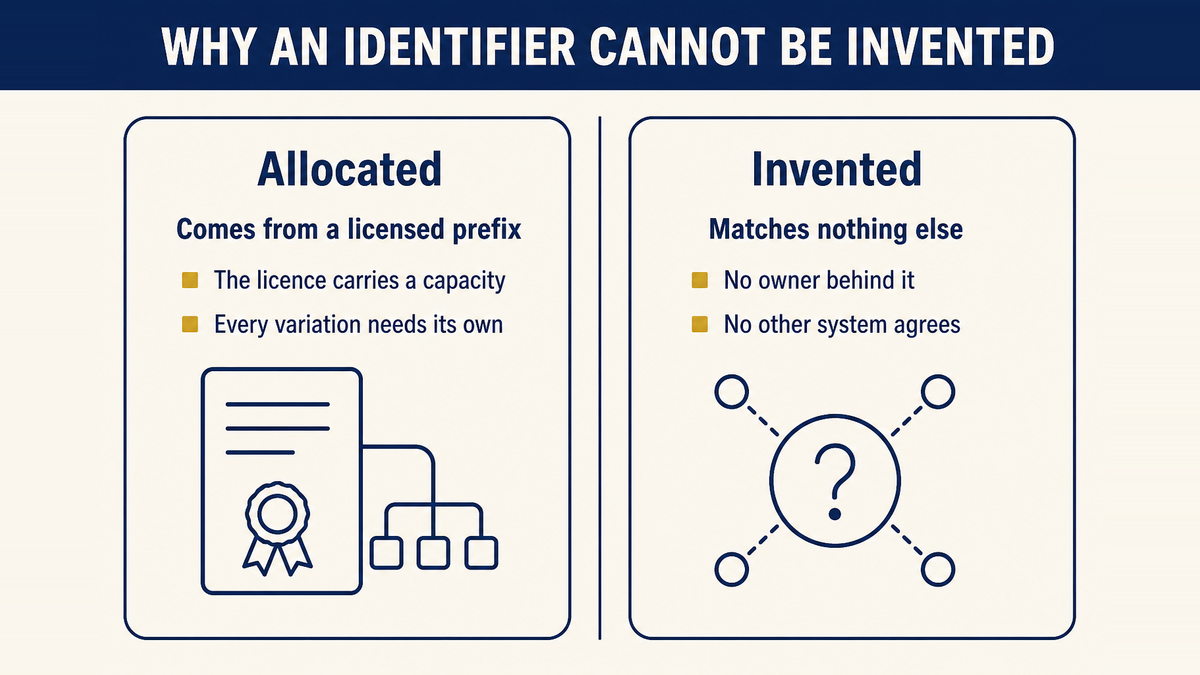
You can license a GS1 Company Prefix, for one company, that comes in different “capacities” representing the maximum number of unique products you can identify with that license. … The most important thing to understand is that each variation of each product you sell requires a unique barcode.
Two consequences follow, and both are practical rather than legal. The first is that identifiers are allocated rather than invented: a barcode comes from a licensed prefix, and the licence carries a capacity, which is a limit on how many distinct products you may identify. The second is about ownership. If you are selling a product made by somebody else, that product already has an identifier, and it belongs to whoever arranged for the barcode. The identifier itself is a standard with a defined owner, which is why an automated listing can be built on somebody else's product identity but cannot create one.
For a store that buys per order, that is usually fine, because you never needed to identify anything yourself. It starts to matter the moment you try to sync stock or prices across more than one sales channel, because a sync is a matching exercise, and matching requires that both sides already agree on what the thing is. A seller who has been copying product names between systems discovers this at the point where two channels disagree about whether an item is one product or two.
3. Why Do Exceptions Get Less Visible Rather Than Less Frequent?
Because automation does not remove the exception, it removes the person who used to walk past it. That sentence is the whole section, but it is worth unpacking, because the effect is counter-intuitive and it is the main reason automation disappoints people who adopted it expecting relief.
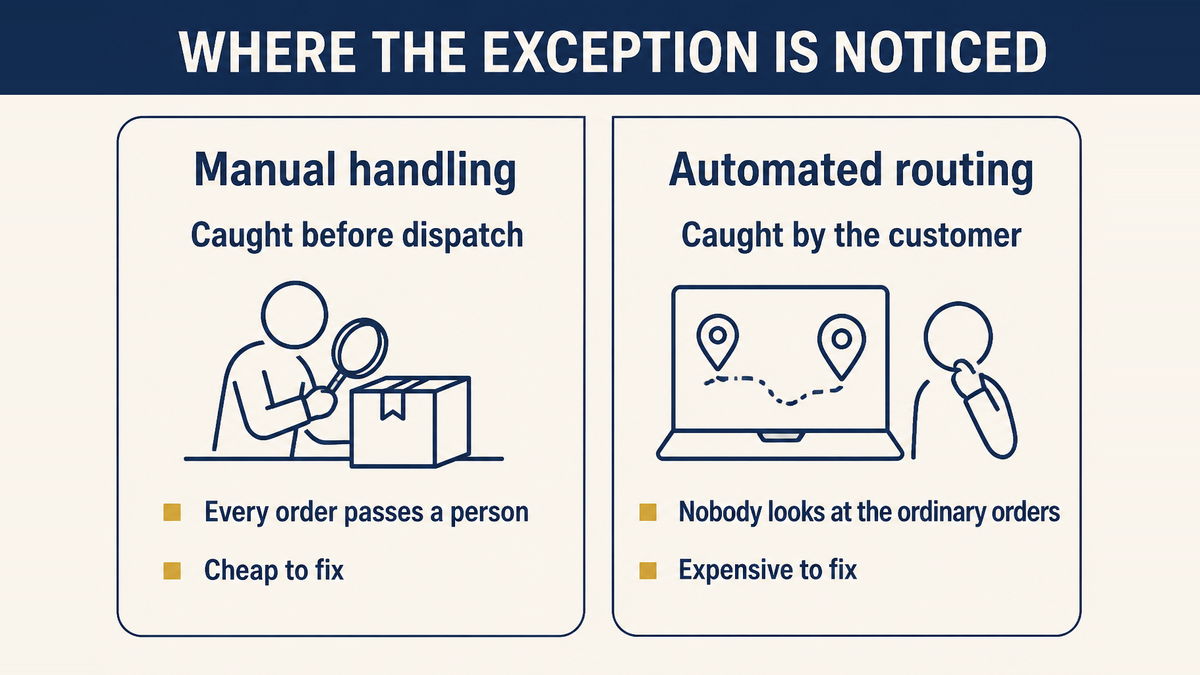
Manual processing is inefficient in a way that is also protective. Every order passes a human being, and that human being notices things: the address looks incomplete, this product has not been available for a week, the price on this line is different from the price on the order. Nobody enjoys this, and it consumes hours that feel wasted, but it means problems are caught at the point where they are cheap. A wrong address caught before dispatch costs a minute. The same address caught after a failed delivery costs a return, a replacement and a customer who has already formed a view about your store.
When you automate the routing, the ordinary majority of orders pass through untouched. That is exactly the benefit you paid for. But the exception also passes through untouched, because the automated path has no reason to distinguish it, and it will keep moving the order while the only disagreement is in data the system treats as correct. The failure is not that automation made a mistake. It is that automation did what it was told with an input that was wrong, and the first party to notice is the customer, several weeks later, in a message you cannot answer.
So the exception rate does not rise. What rises is the average cost of each one, because the discovery has moved late in the process, and the late stages are where a small problem becomes an expensive one. The practical implication is that automating the ordinary path makes some form of exception monitoring compulsory rather than optional. If you remove the step where a person used to notice things, you have to put noticing somewhere else.
4. How Should You Work Out Whether It Pays?
In one direction only: hours saved first, then the exception cost subtracted, and the exception rate as the number that decides the outcome. Most tool comparisons stop at the first step, which is why the conclusion is always yes.
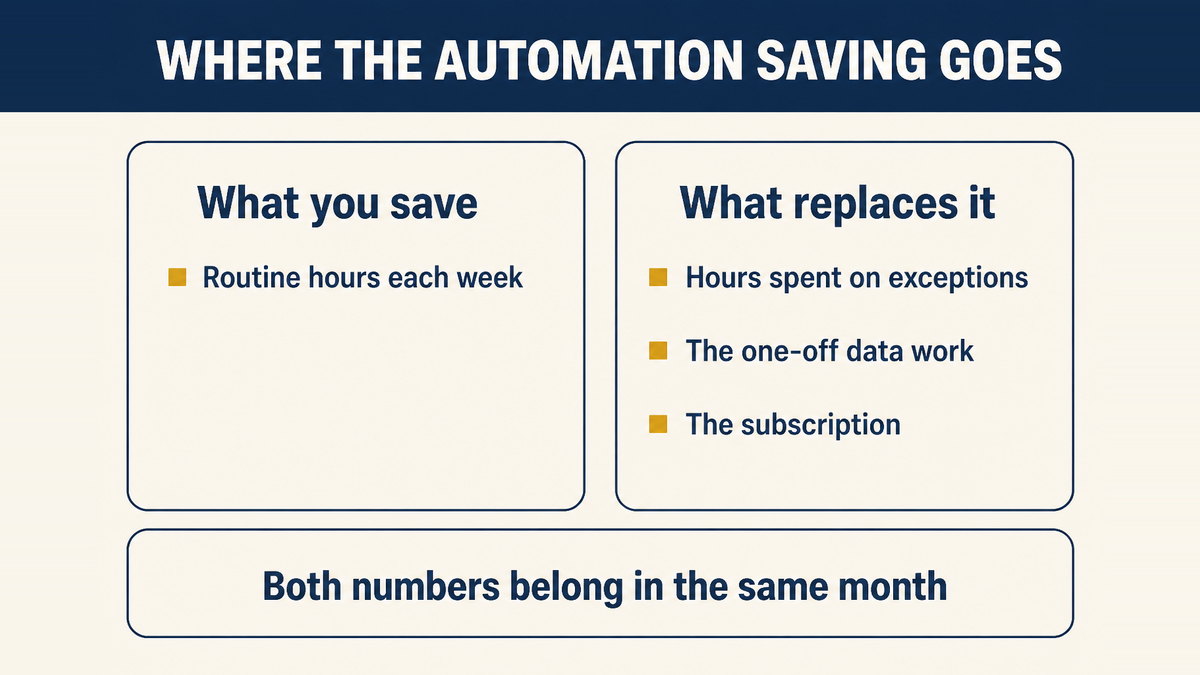
Work it through on a small store. Say automation removes an hour of routine work a week, which is a realistic figure for a low volume operation, and imagine that a share of orders need a person to intervene. If only a small share do, and each intervention is a quick correction, the saving stands. If the share is larger, and each intervention involves a customer message, a replacement and a conversation, then the cost of the exceptions can consume the saving before you have accounted for the subscription at all.
There is a second number people tend to leave out, which is the setup cost. Paying for a tool takes an afternoon. Making the data underneath it correct is a project, it happens once, and it is the part that determines whether the tool does anything useful. Budgeting for the subscription and not for the data work is the most common way this goes wrong, and our guide to what product research tools measure and what they miss makes the same point about a different category of software.
The reason the exception term is so easy to leave out is that it arrives late and in a different part of the business. The saving shows up in your own working week, which you feel immediately. The exception cost shows up as customer messages, replacements and refunds, which are spread across the month and can be read as one-off bad luck rather than as the ongoing price of the change. Separating them is a matter of discipline rather than of accounting skill: put both numbers in the same place, for the same period, before you conclude that the tool paid for itself.
This is also the point at which the accounting stops being about software. If exceptions are what actually cost you money, then reducing how often they occur is worth more than handling them faster, and that is a supply question rather than a systems question. Our guide to pre-shipment inspection is the piece that reduces the wrong-item and damaged-item share of those exceptions, and our notes on how production delays are tracked and penalised with a Chinese factory cover the timing side of the same problem.
5. Why Does a Rule Already Expect You to Have a System?
Because the answer to "could you reasonably have expected to deliver on time" is treated as a question about evidence rather than about outcomes. The language is older than e-commerce and it applies to mail order as well as to online selling.
In any action brought by the Federal Trade Commission, alleging a violation of this part, the failure of a respondent-seller to have records or other documentary proof establishing its use of systems and procedures which assure the shipment of merchandise in the ordinary course of business within any applicable time set forth in this part will create a rebuttable presumption that the seller lacked a reasonable basis for any expectation of shipment within said applicable time.
16 CFR 435.2(a)(4), Mail, Internet, or telephone order sales
Read the phrase carefully, because it is doing more work than it appears to. The rule contemplates a seller having systems and procedures, and it treats the absence of records about them as evidence against you. Automation is one way of having such a system, and the record it produces as a by-product is close to what the rule describes.
But notice the qualifier. The system has to assure shipment in the ordinary course of business. That phrase excludes the version of automation that works beautifully on a normal Tuesday and quietly fails whenever stock changes or a supplier substitutes an item, because the whole point of the requirement is the ordinary course rather than the good days. A system that only works when nothing unusual happens is not the system this sentence is describing.
Two ways automation creates risk rather than removing it. The first is automating an action you have not decided how to handle manually, which simply makes an unresolved question happen faster and more often. The second is letting the automated record replace judgement: a status field that says shipped is not the same as a parcel that has moved, and treating the first as proof of the second is how a store ends up certain about something that is not true. Our guide to what supplier assurances commonly turn out to mean is worth reading on that second point.
6. What Should You Automate First?
The step where you currently cannot see what is happening. Not the step that annoys you most, and not the step with the largest hourly saving, because those two answers both optimise the wrong thing.
The reasoning is that visibility has two returns. It saves the time you currently spend asking, and it creates the record you would need if a delivery is later disputed. A seller who knows automatically when an order leaves a warehouse gains something that a seller who has automated a spreadsheet has not, because the first has removed a blind spot while the second has only removed typing.
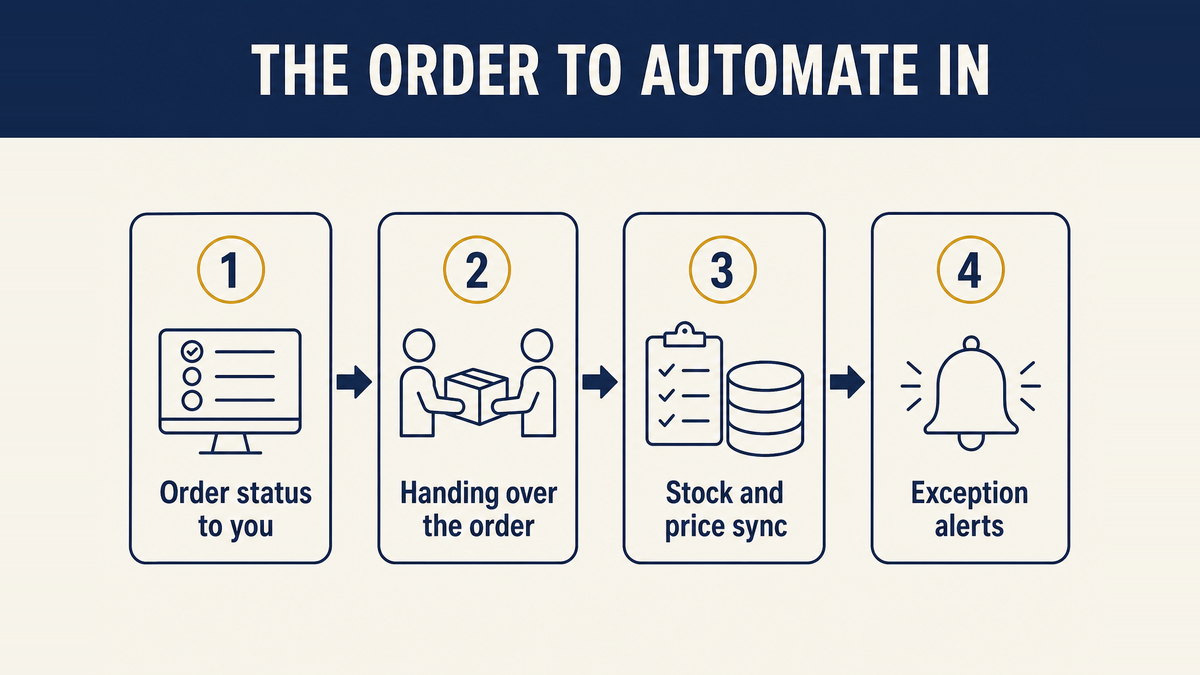
- Order status arriving to you without asking
- Usually the highest-value first step. It removes the manual chase and produces the record trail as a by-product rather than as extra work.
- Handing an order to the supplier
- The most obviously automatable step, and genuinely identical every time. Worth doing, but it delivers less than it looks like it will, because it removes minutes rather than uncertainty.
- Syncing stock or prices across channels
- Only worth starting once the identifiers agree. Attempting it earlier produces a system that confidently writes the wrong number, which is worse than no sync at all. Our notes on connecting a store to a China warehouse through an ERP cover the mechanics of that connection.
- Exception alerts
- Not glamorous, and the step most often skipped. If you have removed the person who used to notice things, something has to do the noticing.
Two pieces to read alongside this one. Our guide to what a third-party warehouse charges to store, pick and send an order covers the arrangement that makes an automatic status feed possible in the first place, and our notes on moving from per-order buying to holding stock cover what changes about all of this once you control the inventory number yourself.
7. Frequently Asked Questions
What can dropshipping automation actually not do?
It cannot make a decision. Automation is good at the part of the process that repeats identically, where the correct action is the same every time. It has nothing to offer where the correct action depends on judgement, which is precisely the case for a stockout, a changed price or an address that looks wrong.
Do I need a barcode to automate listings and stock sync?
You need an identifier that both systems already recognise. A barcode is not something you can invent: GS1 issues barcodes through a licensed GS1 Company Prefix, and the licence caps how many unique products you may identify with it. If you are selling somebody else's product, that product's identifier already exists and belongs to its brand owner.
Why does automation make exceptions worse?
Because it removes the person who would have noticed. Manual processing forces every order past a human, which is slow but catches problems early. Automation lets the ordinary majority pass untouched, so the exception also passes untouched and is discovered by the customer instead.
How do I work out whether automation is worth it?
Compare the hours it saves against the hours spent handling exceptions, and look at how often exceptions occur. If a small share of orders needs a person and each one costs many times an ordinary order to fix, a high exception rate can consume everything the automation saved.
Which part of a dropshipping operation should be automated first?
The part where you currently cannot see what is happening. Order status arriving to you automatically is usually the first useful step, because it both saves time and creates the record you would need if a delivery dispute arises.
Two Weeks of Exceptions, Categorised
We return a fortnight of exceptions sorted by cause, with the minutes each one consumed, so payback becomes arithmetic rather than opinion.
Sort My Exceptions
Questions & Comments
We read every one and reply within 24 hoursWorking out which steps in your order flow are genuinely identical and which ones still need a person, stuck on identifiers when syncing stock across channels, or unsure how you would notice a failed order after removing the manual check? Post how an order reaches your supplier and how you find out what happened to it, and our team will help you draw the line.